
Notice
Recent Posts
Recent Comments
Link
| 일 | 월 | 화 | 수 | 목 | 금 | 토 |
|---|---|---|---|---|---|---|
| 1 | 2 | 3 | 4 | |||
| 5 | 6 | 7 | 8 | 9 | 10 | 11 |
| 12 | 13 | 14 | 15 | 16 | 17 | 18 |
| 19 | 20 | 21 | 22 | 23 | 24 | 25 |
| 26 | 27 | 28 | 29 | 30 |
Tags
- try-except
- Could not find a declaration file for module
- static Generation
- tsconfig.json
- shell명령어
- 문자열겹쳐쓰기
- localhost접속안됨
- localhost연결안됨
- 타입에러
- 무료파이썬
- import에러
- npm error!
- GIT
- s not assignable to type
- 모듈을 찾을 수 없습니다
- 프로그래머스
- 공식문서활용
- 모듈이 아닙니다
- 초기화함수
- 파이썬
- python
- nextjs
- 깃헙 올리기
- rewrites
- 버전 충돌
- 시멘틱 요소
- 단락평가
- as연산자
- 리스트
- 쓰기용으로 열 수 없습니다
Archives
- Today
- Total
전진하는 개발러
[ERROR 해결] Could not find a declaration file for module 해결 본문
오류 : react-router-dom에 빨간 밑줄 생김 + Could not find a declaration file for module
에러코드
ERROR in src/Router.tsx:1:31
TS7016: Could not find a declaration file for module 'react-router-dom'. 'C:/Users/user/OneDrive/바탕 화면/프로그래밍/코딩 강의/노마드코더/reactForMasters/coinTracker/my-app/node_modules/react-router-dom/index.js' implicitly has an 'any' type.
  Try `npm i --save-dev @types/react-router-dom` if it exists or add a new declaration (.d.ts) file containing `declare module 'react-router-dom';`
  > 1 | import { Switch, Route } from "react-router-dom";
      |                               ^^^^^^^^^^^^^^^^^^
    2 | import Coin from "./routes/Coin";
    3 | import Coins from "./routes/Coins";
    4 | import { BrowserRouter } from "react-router-dom";
위 에러 코드 설명에 따르면, 해결법은 다음 2가지로부터 나와야한다.
🍎해결 시도
1. npm i --save-dev @types/react-router-dom 입력해보기 -> package.json을 보면 이미 설치되어있음. 이 문제가 아님.
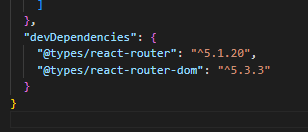
2. declare module react-router-dom 을 정의한 d.ts파일을 만들어라.
원인분석 : 유효하지않은 명령어를 입력해서 Install이 안 된줄 알았음
온갖 구글링을 해보다가 답을 찾아냄!
TypeScript 컴파일러가 @types 디렉토리를 정확하게 인식하고 있는지 확인해야 함.
tsconfig.json 파일을 열어보고. 다음과 같은 설정을 확인해봐야함 !!
{ "compilerOptions": { "types": ["node", "react", "react-dom"],
"typeRoots": ["node_modules/@types"] } }
위 설정은 "typeRoots" 배열에 **"node_modules/@types"**를 추가하여 타입 선언 파일을 검색할 위치를 지정하는 것임. 다. "types" 배열은 프로젝트에서 사용하는 기본 타입 선언을 지정 가능. 이 설정을 추가한 후에는 프로젝트를 다시 빌드해야 할 수도 있음.
출처 : https://typescript-kr.github.io/pages/tsconfig.json.html
🍎결론🍎
1. npm i --save-dev @types/react-router 입력해서 설치해보기
2. 안되면, , tsconfig.json파일에 위 코드 잘 정의됐는지도 확인해주기!!!!!!
'ERROR 해결' 카테고리의 다른 글
| [ERROR해결] VirtualBox [장치] > [게스트 확장 CD 이미지 삽입] 클릭 후 무반응 문제 해결 (0) | 2023.08.05 |
|---|---|
| [ERROR해결] localhost 8080 연결 안됨 (0) | 2023.08.02 |
| [ERROR해결] 'next'은(는) 내부 또는 외부 명령, 실행할 수 있는 프로그램, 또는 배치 파일이 아닙니다. (0) | 2023.07.29 |
| [ERROR 해결] This page could not be found 404 (0) | 2023.07.21 |
| [ERROR 해결] npm error! code ENOENT npm error! syscall opennpm error! path ... npm error! errno -4058 npm error! enoent (0) | 2023.07.15 |
'ERROR 해결' Related Articles
more


